
vd Usage Guide
vd manages skills in this repository from source import through local agent installation. Use this page as the quick operational guide; see commands.md for full flag-level reference.
Core Workflow
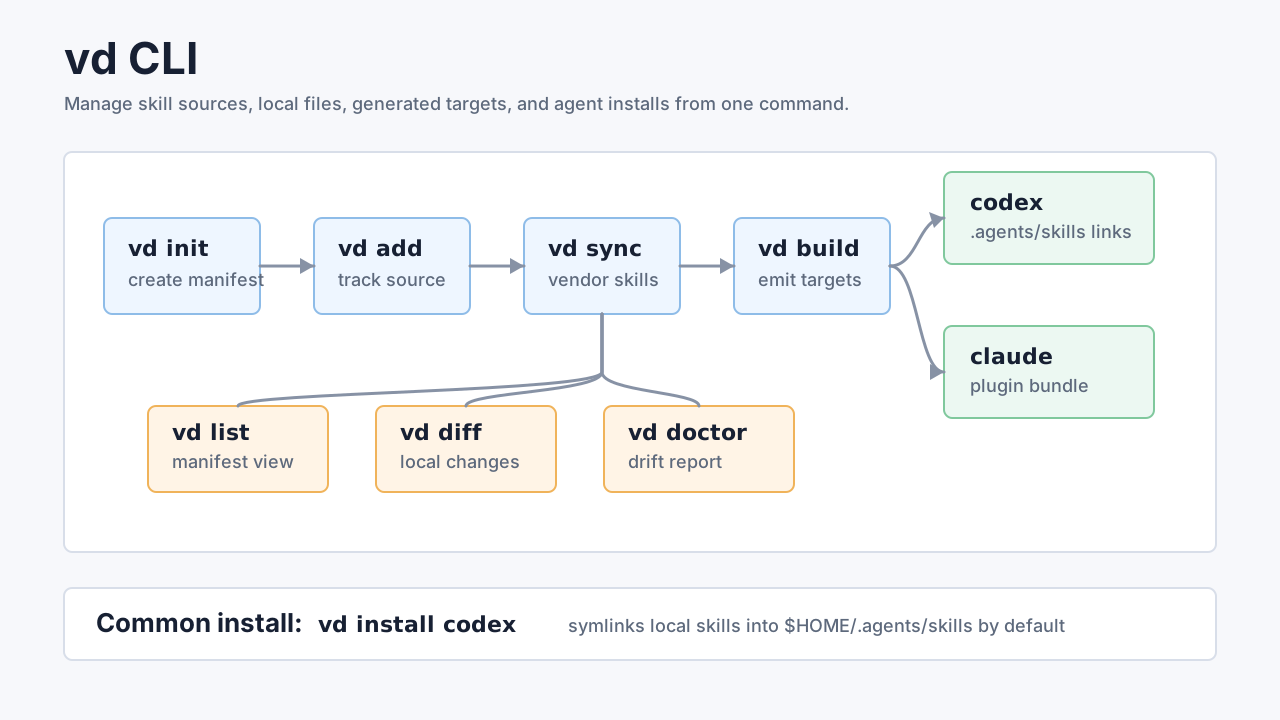
Section titled “Core Workflow”Start by creating a manifest, registering skills, syncing them to disk, and building local agent targets:
vd initvd add browserbase/skills/browser --as browservd syncvd buildvd init creates skills.toml. vd add records an upstream skill source. vd sync vendors tracked skills into skills/<name>/, updates skills.lock, and runs vd build unless --no-build is set. vd build regenerates Claude plugin metadata plus repo-scoped Codex symlinks and Droid and Pi entries.
Main Features
Section titled “Main Features”| Feature | Commands | Purpose |
|---|---|---|
| Manifest setup | vd init | Create or refresh skills.toml from repository defaults. |
| Fetch skills | vd bootstrap | Clone vanducng/skills into ~/.vd/skills so a fresh install has skills to install from. |
| Upstream tracking | vd add, vd sync, vd update | Register skills, vendor them locally, and move tracked skills to upstream HEAD. |
| Version control | vd pin, vd detach, vd remove | Freeze a skill at a SHA, stop tracking it, or remove it cleanly. |
| Inspection | vd list, vd diff, vd doctor | Review tracked skills, compare local edits, and detect drift from skills.lock. |
| Target builds | vd build claude, vd build agents, vd build droid, vd build pi | Generate .claude-plugin/ files, .agents/skills/ symlinks, and .factory/skills/ and .pi/skills/ entries. |
| Agent install | vd install codex, vd install droid, vd install pi, vd install cursor, vd install claude | Install local skills into Codex, Factory Droid, Pi, Cursor, or Claude Code. |
| Cache control | vd cache clean | Remove .vd-cache/ and force future fetches to repopulate it. |
| Self-update | vd upgrade | Replace the running binary with the latest release (brew update && brew upgrade vanducng/tap/vd for Homebrew). |
Common Commands
Section titled “Common Commands”vd list # show manifest skills and lock SHAsvd doctor # report modified, missing, or untracked skill dirsvd diff research # compare cached upstream vs skills/research/vd update # update all tracked skillsvd pin browser abc1234 # pin browser to a specific commitvd detach research # keep files but stop upstream trackingvd remove browser --keep-files # untrack without deleting filesvd cache clean # remove the repo download cacheUse --root <path> or VD_ROOT=/path/to/repo when running vd outside the repository. Set VD_NO_UPDATE_CHECK=1 to disable release checks.
Installing Into Agents
Section titled “Installing Into Agents”No skills repo of your own? Run vd bootstrap first to fetch the maintained skill set into ~/.vd/skills; vd install then resolves it automatically (and offers to bootstrap if nothing is found).
With no agent argument, vd install detects which agents exist on this machine (~/.claude, ~/.agents, ~/.cursor, ~/.factory, ~/.pi) and installs skills at user scope into each one. --scope repo still requires an explicit agent. Use --pick for the old interactive list.
Codex installs use symlinks by default so local edits in skills/<name>/ are visible after restarting Codex:
vd install codex # symlink all skills to $HOME/.agents/skillsvd install codex research plan # install selected skillsvd install codex --scope repo # symlink into .agents/skills for this repovd install codex --copy --force # replace existing entries with copied snapshotsvd install # detect local agents; install user-level into eachvd install --pick # old numbered picker (user / repo / copy)Droid uses the same guarded symlink/copy flow with Factory’s native discovery paths:
vd install droid # install all skills to $HOME/.factory/skillsvd install droid research plan # install selected skillsvd install droid --scope repo # install into .factory/skills for this repovd install droid --copy --force # replace existing entries with copied snapshotsvd install droid --dry-run # preview without writing filesOn Unix, Droid entries are relative symlinks by default. On Windows, vd creates copies; rerun with --force to refresh an existing copy. Restart Droid, run /skills, and invoke an installed skill with /skill-name. Droid support is skills-only; plugins, hooks, custom droids, and observability are not installed.
Pi uses the same guarded symlink/copy flow with Pi’s native discovery paths. Note its user and repo scopes differ: user scope writes $HOME/.pi/agent/skills, while repo scope writes .pi/skills:
vd install pi # install all skills to $HOME/.pi/agent/skillsvd install pi research plan # install selected skillsvd install pi --scope repo # install into .pi/skills for this repovd install pi --copy --force # replace existing entries with copied snapshotsvd install pi --dry-run # preview without writing filesOn Unix, Pi entries are relative symlinks by default. On Windows, vd creates copies; rerun with --force to refresh an existing copy. Restart Pi, run /skills, and invoke an installed skill with /skill-name. Pi support is skills-only; prompts, extensions, and observability are not installed.
Cursor uses the same guarded symlink/copy flow with Cursor’s native discovery paths. User scope writes $HOME/.cursor/skills (or $VD_CURSOR_HOME/skills when that inventory override is set); repo scope writes .cursor/skills. This is a first-class Cursor target for local Cursor and Cursor Cloud Agents — not an alias of vd install codex:
vd install cursor # install all skills to $HOME/.cursor/skillsvd install cursor research plan # install selected skillsvd install cursor --scope repo # install into .cursor/skills for this repovd install cursor --copy --force # replace existing entries with copied snapshotsvd install cursor --dry-run # preview without writing filesOn Unix, Cursor entries are relative symlinks by default. On Windows, vd creates copies; rerun with --force to refresh an existing copy. Restart Cursor (or start a new Cloud Agent) to pick up newly installed skills. Cursor support is skills-only; it does not install plugins, marketplace bundles, or hooks.
Claude Code installs build the plugin bundle, register this repository as a marketplace, and install the configured plugin. Use --dev for per-skill symlinks into $HOME/.claude/skills instead:
vd install claudevd install claude --dev # per-skill symlinks into ~/.claude/skillsvd install claude --dry-runSafe Update Pattern
Section titled “Safe Update Pattern”Before pulling upstream changes, check local state:
vd doctorvd diff <skill>vd update <skill>